Property management software Uganda

Run properties, rent, tenants, maintenance, and finance from one workspace.

SwApp Property Management gives landlords and property teams one connected system for buildings, units, occupants, leases, rent billing, collections, maintenance, utilities, public listings, tenant communication, and portfolio reporting.

Residential and commercial portfolios Rent billing and payment records Tenant, maintenance, and finance workflows
Built for day-to-day property operations

Replace scattered rent sheets, tenant files, and maintenance chats with one operating record.

The property workspace connects occupancy and finance. A unit, occupant, lease, invoice, payment, maintenance request, and report can be followed without rebuilding the story in separate spreadsheets.

Properties, units, and occupancy

Organize residential or commercial properties, unit details, availability, occupancy dates, rentable area, and listing status in a consistent portfolio structure.

  • Multi-property portfolio view
  • Residential and commercial units
  • Move-in, move-out, and occupancy history

Tenants, leases, and documents

Keep occupant contacts, taxpayer details, lease terms, deposits, supporting documents, and tenancy history connected to the right property and unit.

  • Occupant profiles and history
  • Lease dates, deposits, and documents
  • Tenant portal invitations

Rent billing, collections, and receipts

Generate rent invoices, record or request payments, allocate collections, issue receipts, handle adjustments, and retain an audit trail for finance follow-up.

  • Recurring billing workflows
  • Payment allocation and receipts
  • Invoice adjustments and audit records

Maintenance and service providers

Capture tenant or staff requests, assign vendors, track priority and progress, schedule recurring work, attach documents, and keep costs visible.

  • Requests, schedules, and occurrences
  • Vendor and document records
  • Status, cost, and completion tracking

Utilities and service charges

Manage meters, readings, utility bills, shared costs, and service-charge reconciliation alongside the rent ledger.

  • Meter and reading records
  • Utility billing
  • Service-charge reconciliation

Listings, applications, and reports

Publish available units, receive rental inquiries and applications, review applicants, then monitor occupancy, arrears, income, expenses, and audit activity.

  • Public property and unit listings
  • Application review workflow
  • Portfolio, finance, and operational reports
Key capabilities

What your team can use this module to do.

Focus on the action, the status, and the record your team needs after the transaction starts.

Portfolio and property workspaces

See the whole portfolio, then open a focused workspace for each property with its own units, occupants, invoices, maintenance, utilities, finance, reports, and settings.

Move-in and move-out workflows

Record new or existing tenancies through structured full-page workflows, including dates, occupant details, lease terms, deposits, and opening financial position.

Rent invoices and payment allocation

Run billing, review invoices, record manual payments, generate payment links, allocate receipts, correct errors, and preserve the transaction trail.

Tenant self-service

Invite active occupants to a tenant portal where they can review invoices and receipts, access documents, send messages, and submit maintenance requests.

Maintenance control

Track requests from report to completion with priorities, assignees, vendors, schedules, supporting files, costs, and notes.

Commercial and utility records

Capture rentable area, commercial use, fit-out information, meters, readings, utility charges, shared costs, and service-charge reconciliations.

Public listings and applications

Publish available properties and units, collect inquiries and applications, review applicants, and move approved occupants into the operating workspace.

Finance, tax, and audit readiness

Keep income, expenses, deposits, taxpayer profiles, invoice history, exports, and audit events together. Optional EFRIS workflows can be configured when the business account is ready.

Property module screens

Give every team the view they need without losing the shared record.

Portfolio managers can monitor performance, property teams can run daily operations, and finance can follow invoices and collections from connected screens.

SwApp Property
Portfolio overview

Occupancy, rent, and arrears

Live
Units 126
Occupied 91%
Collected UGX 184M

Monitor the portfolio without opening separate spreadsheets for occupancy, billing, collections, and lease follow-up.

Property workspace
Daily operations

Units, tenants, and maintenance

Managed
Occupied 22
Available 3
Open jobs 5

Keep unit availability, tenant changes, recurring work, and property documents visible to the operating team.

Property finance
Collection control

Invoices, payments, and reconciliation

Reconciled
Invoiced UGX 196M
Paid UGX 184M
Outstanding UGX 12M

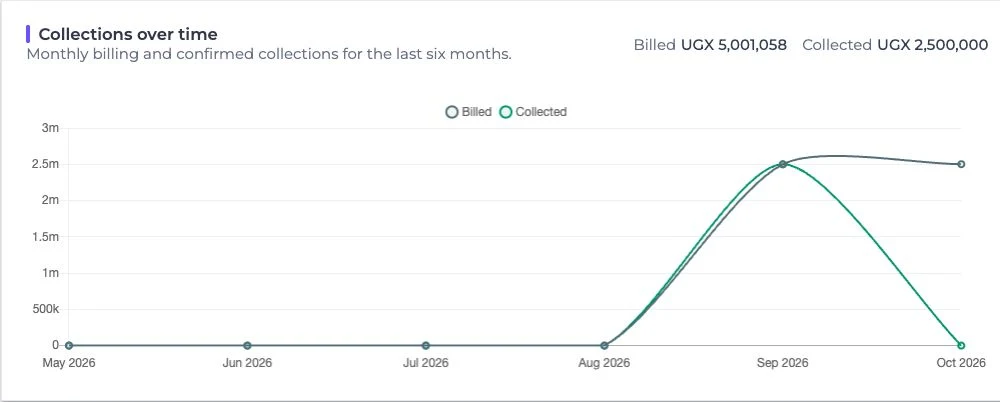
Finance can trace what was billed, what was collected, where it was allocated, and which balances still need action.

Property management pricing

Pricing follows portfolio size, enabled workflows, and onboarding needs.

A property portfolio can start with core property, unit, tenant, and billing records, then add integrations and operational workflows as the team grows.

Platform subscription

Quoted by portfolio

Pricing considers active properties, units, users, enabled workflows, reporting needs, and the required support level.

Setup and migration

Scoped once

Existing properties, units, tenants, leases, balances, and supporting files are reviewed before migration and onboarding are priced.

Payment collections

Standard fees

Payment links and supported collection channels use applicable SwApp transaction fees, with each payment retained for allocation and reporting.

What to note

  • Small portfolios can begin with the core workspace and expand later.
  • Implementation can include configuration, import templates, finance checks, staff onboarding, and operating handover.
  • A demo should confirm unit count, billing policy, payment volume, tenant communication, utility needs, and migration quality before pricing is finalized.
Best fit

Who this is for.

Use this when your team needs a controlled workflow, reliable records, and follow-up after money moves.

  • Individual landlords with growing portfolios
  • Property management companies
  • Apartment and residential estate managers
  • Commercial building managers
  • Mixed-use property owners
  • Finance and rent collection teams
  • Maintenance and facilities teams

Typical workflow

  1. Create the property, configure rent, billing, tax, deposit, utility, and operating policies, then add its units.
  2. Publish available units or move an existing tenant into the correct unit with their lease and opening balance.
  3. Run recurring billing, collect and allocate payments, issue receipts, and follow arrears or expiring leases.
  4. Manage maintenance, utilities, expenses, tenant communication, reconciliations, and portfolio reports from the same records.
Property software questions

Questions landlords and property teams ask before choosing a system.

These answers explain how the property module fits rental operations, finance, tenant service, and portfolio growth.

Can SwApp manage both residential and commercial properties?

Yes. The property module supports residential, commercial, and mixed portfolios, including units, rentable area, occupancy, leases, billing, utilities, maintenance, and property-level reporting.

Can tenants pay rent through mobile money?

Yes. Property teams can create supported payment links and record or allocate collections against the correct tenant, property, invoice, and receipt record.

Does the system create rent invoices and receipts?

Yes. Teams can run billing, review invoices, record and allocate payments, issue receipts, make controlled adjustments, and retain an audit trail.

Can tenants report maintenance issues online?

Yes. Invited occupants can use the tenant portal to submit maintenance requests and messages. Staff can then assign, schedule, document, cost, and close the work.

Can we advertise vacant units and receive applications?

Yes. Available properties and units can have public listing pages for inquiries and applications, with an internal review workflow before move-in.

Can an existing portfolio be migrated from spreadsheets?

Yes. Onboarding can include properties, units, occupants, leases, opening balances, and other historical records. The migration plan depends on the completeness and consistency of the source data.

How is SwApp Property Management priced?

Pricing is quoted using portfolio size, active units, users, enabled workflows, migration effort, reporting needs, integrations, and support requirements.

Ready to see how this fits your organization?

Tell us about your collections, payouts, reconciliation, or operating workflow today. We will map the right SwApp modules to that workflow.

Request a consultation