SACCO management system Uganda

Cloud SACCO management system in Uganda with mobile money payments built in.

SwApp SACCO software helps Ugandan SACCOs, investment clubs, and savings groups replace spreadsheets with one workflow for member onboarding, savings, shares, guarantors, collateral, loans, approvals, mobile money collections, accounting ledgers, audit records, reports, migration imports, and period closes.

Cloud SACCO management system Mobile money collections Loans, shares, ledgers, reports
Built for SACCO operations

A SACCO system should match the work committees, treasurers, and members already recognize.

A useful SACCO management system in Uganda has to cover members, savings, shares, loans, mobile money, guarantors, reports, pricing, and audit trails. SwApp connects those records with licensed payment collection and reconciliation workflows.

Member onboarding, savings, and shares

Keep the member register clear for account opening, committee reviews, member statements, share balances, mandatory savings, fines, withdrawals, and contribution references.

  • Member profiles and member IDs
  • Savings, shares, fines, and withdrawals
  • Contribution timelines and balances

Loan portfolio, guarantors, and approvals

Move from paper loan files to controlled loan products, guarantor records, collateral, approval requests, repayment schedules, arrears checks, write-offs, and provisioning workflows.

  • Loan products and applications
  • Guarantors, collateral, and repayment schedules
  • Arrears, aging, approvals, and write-offs

Mobile money collections and reconciliation

Give members public payment pages for contributions, savings, fines, or loan repayments, then let accountants review, allocate, confirm, and reconcile each incoming payment.

  • Member contribution pages
  • Mobile money payment references
  • Finance review before posting

Accounting, audit trail, and reports

Support chart of accounts, ledger entries, expenses, bank reconciliations, role-based approvals, audit activity, period closes, and reports for treasurers, boards, and finance teams.

  • Ledgers, cash movement, and expenses
  • Roles, approvals, and audit records
  • Committee and finance reports

Migration from Excel or legacy SACCO records

Bring across historical member records, opening balances, savings, loans, investments, products, and accounting data through a phased migration plan.

  • Opening balances and import templates
  • Savings, loan, and investment history
  • Staff onboarding and handover

Investment clubs and portfolio accounting

Support SACCOs and investment groups that pool member capital, track portfolios, value assets, manage receivables, and distribute investment income.

  • Member capital and shareholding snapshots
  • Portfolio valuations and receivables
  • Dividends and income distributions
Key capabilities

What your team can use this module to do.

Focus on the action, the status, and the record your team needs after the transaction starts.

Cloud SACCO system levels

Start with savings only, add loans, run an investment club, or combine savings, loans, member capital, portfolio records, and accounting controls.

Members, savings, and share accounts

Track member profiles, member IDs, account opening details, mandatory savings, deposits, shares, fines, withdrawals, and payment references.

Loan lifecycle and guarantor management

Manage loan products, applications, approvals, guarantors, collateral, repayment schedules, repayments, arrears, write-offs, and provisioning workflows.

Investment club and portfolio accounting

Track member capital, shareholding snapshots, portfolios, valuations, receivables, land subdivision plots, dividends, and income distributions.

Accounting controls, roles, and audit trail

Maintain ledger entries, expenses, products, accounts, bank reconciliations, audit activity, approvals, user roles, and period-close records.

Migration imports and opening balances

Onboard existing SACCOs through phased imports for members, opening balances, contributions, loans, investment data, and accounting controls.

Member payment pages and mobile money reconciliation

Give members a public contribution page while accountants review, allocate, confirm, and reconcile mobile money and card collections.

Reports for boards, committees, and finance teams

Use reports and exports for members, contributions, loans, arrears, shareholding, investments, bank activity, and accounting follow-up.

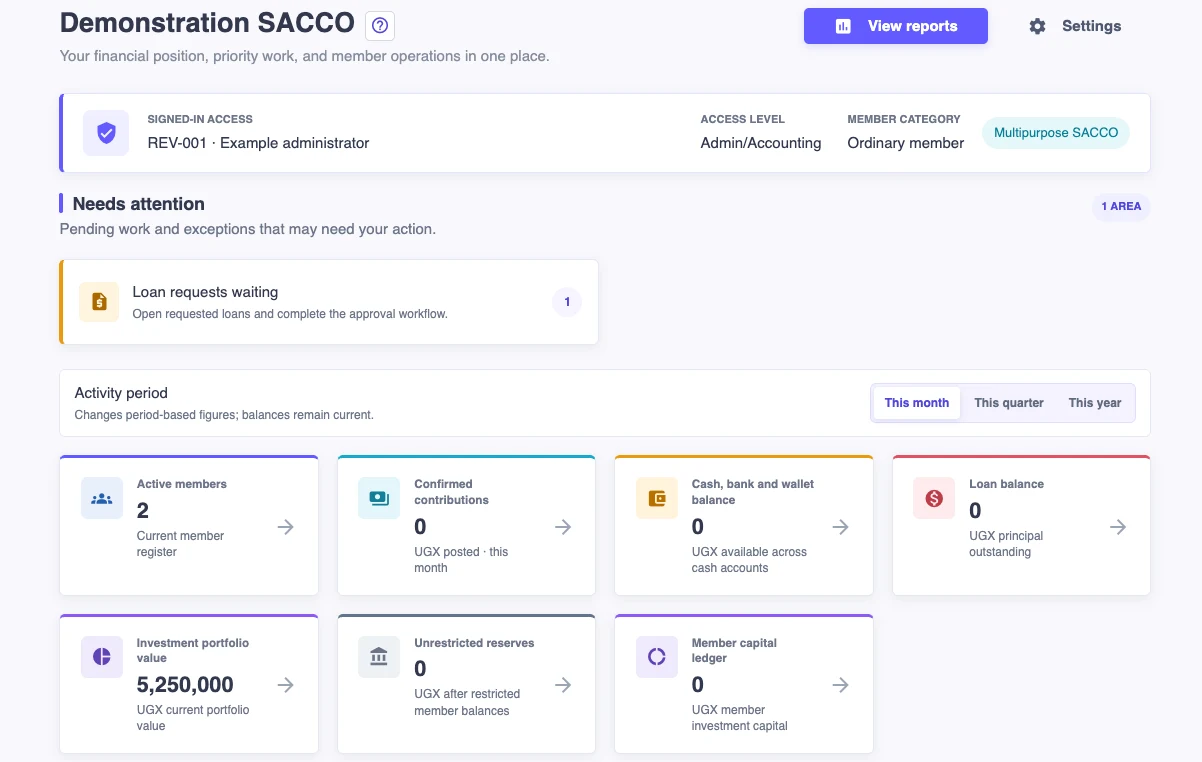
SACCO module screens

Show the committee real records, not another spreadsheet.

The SACCO module is built around daily operations and finance controls: members, contributions, loans, investments, accounting, and reports stay connected.

SwApp SACCO
Operations overview

Members, contributions, and loans

Active
Members 428
Savings UGX 1.8B
Loans UGX 640M

Give managers and treasurers one place to see active members, contribution status, loan exposure, and payment follow-up.

Loans and accounting
Finance control

Approvals, ledger, and reconciliation

Controlled
Aging 4 bands
Ledger Posted
Close Monthly

Move loan repayments, expenses, approvals, ledger entries, bank checks, and period closes into a controlled workflow.

Investment club
Shareholding

Capital, portfolios, and distributions

Tracked
Capital UGX 2.4B
Portfolios 8
Plots 42

Useful for SACCOs and investment clubs that pool money, buy assets, track ownership, and distribute income.

SACCO pricing and rollout

Clear SACCO pricing starts with member count, modules, migration, and payment volume.

SACCO buyers need concrete pricing signals before they book a demo. SwApp quotes around the SACCO level, active member count, enabled workflows, migration work, support, and payment collection fees.

Module subscription

Quoted by SACCO

Pricing is based on the SACCO level, active member count, enabled modules, user roles, reporting requirements, and support model.

Migration and setup

Scoped once

Historical member records, opening balances, loans, investment schedules, and accounting data are reviewed before migration pricing is agreed.

Payment collections

Standard fees

Member contribution pages use SwApp collection channels, with applicable mobile money or card fees shown during payment and retained for reconciliation.

What to note

  • Savings-only SACCOs can start smaller and upgrade when they add loan, share, investment, or portfolio workflows.
  • Implementation can include configuration, staff onboarding, import templates, audit checks, and finance report handover.
  • A demo should confirm member count, expected payment volume, reporting needs, and migration quality before pricing is finalized.
Best fit

Who this is for.

Use this when your team needs a controlled workflow, reliable records, and follow-up after money moves.

  • Employee SACCOs
  • Community savings groups
  • Investment clubs
  • VSLAs and savings associations
  • Land and project-based SACCOs
  • Accounting officers and treasurers
  • Committees that need approvals and audit records

Typical workflow

  1. Choose the SACCO level and configure contribution, savings, loan, share, role, and accounting policies.
  2. Migrate historical data or create members, products, accounts, and opening balances.
  3. Collect and allocate savings, shares, fines, loan repayments, investment income, and withdrawals.
  4. Run approvals, audit checks, bank reconciliation, period closes, committee reports, and member payment follow-up.
SACCO software questions

Questions SACCO teams ask before choosing management software.

These answers map SwApp to the searches Ugandan SACCO officers, treasurers, accountants, and committee members usually make before requesting a demo or pricing quote.

Is SwApp a SACCO management system or only a payment gateway?

SwApp is a licensed payments platform with a SACCO management module. The SACCO module manages members, savings, shares, loans, guarantors, approvals, ledgers, reports, and member payment pages, while SwApp payment rails help collect and reconcile mobile money and card payments.

Can SwApp manage savings, shares, loans, guarantors, and accounting for a Ugandan SACCO?

Yes. The SACCO module supports member records, savings contributions, shares, fines, withdrawals, loan products, guarantors, collateral, repayment schedules, approvals, accounting ledgers, expenses, bank reconciliation, period closes, and reports.

Can SACCO members pay contributions or loan repayments by mobile money?

Yes. SACCOs can use public member payment pages for contributions and other member payments. Accountants can then review, allocate, confirm, and reconcile those payments against SACCO records.

Can SwApp replace Excel spreadsheets for SACCO operations?

Yes. SwApp is designed to replace scattered spreadsheets for members, savings, shares, loans, approvals, collections, accounting records, bank reconciliation, reports, and audit follow-up.

Can an existing SACCO migrate from Excel or old records?

Yes. SwApp supports phased migration for members, opening balances, contributions, loans, investment schedules, portfolios, and accounting records. The migration scope depends on the quality and volume of historical data.

How is SwApp SACCO pricing calculated?

SACCO pricing is quoted around the member count, enabled modules, number of users, migration scope, support needs, reports, and expected payment collection volume. The demo should produce a clear setup and subscription proposal.

Which SACCOs are a good fit for SwApp?

SwApp is a good fit for employee SACCOs, community savings groups, VSLAs, investment clubs, land or project-based SACCOs, and committees that need controlled workflows, finance reports, approvals, payment reconciliation, and audit records.

Ready to see how this fits your organization?

Tell us about your collections, payouts, reconciliation, or operating workflow today. We will map the right SwApp modules to that workflow.

Request a consultation